World#
The base class for all of your worlds.
Use world.send_message("name") for simple broadcasts between the
world, actors, and docked GUI worlds.
For persistence, world.save_to_db("game.db") stores the current
scene and world.load_world_from_db("game.db") restores it again.
If you only want to restore actors, use
world.load_actors_from_db(...) with the actor classes that should be
recreated.
API Reference#
- class miniworlds.worlds.world.World(x=400, y=400)[Quellcode]#
Base world class for pixel-based scenes.
A world owns the shared runtime state: actors, backgrounds, input handling, and event dispatch.
Notes
Actor positions in a World are pixel coordinates.
New actors start at their top-left position unless their origin is switched to center.
Sprite overlap is used for collision checks by default.
Beispiele
- Create a world directly:
from miniworlds import World
world = World(300, 200) world.run()
- Subclass a world and configure setup values:
import miniworlds
- class MyWorld(miniworlds.World):
- def on_setup(self):
self.columns = 300 self.rows = 200
Öffentliche Datenattribute:
Backward-compatible docking API for older example code.
How often world logic runs relative to the frame loop.
Frames per second of the render loop.
Gets the horizontal size of the world in pixels.
Gets the vertical size of the world in pixels.
Gets the number of horizontal pixels (columns) visible in the world.
Gets the number of vertical pixels (rows) visible in the world.
Gets the world size as a tuple (width, height), in pixels.
Returns the currently active background.
Returns True if the world has at least one background appearance.
Inherited from
WorldBasewindowsizetopleftwidthheightclass_nameregistered_eventsReturns the set of all event names that are currently registered.
Öffentliche Methoden:
__init__([x, y])Initializes the world and all internal managers needed for runtime operation.
contains_position(pos)Checks if position is in the world.
contains_rect(rect)Returns True if the entire rectangle is fully inside the world.
contains_rect_any(rect)Returns True if any part of the rectangle is inside the world.
set_columns(value)Internal method to set columns and sync world width.
set_rows(value)Internal method to set rows and sync world height.
Returns the current active background from the backgrounds manager.
switch_background(background)Switches the current background to a specified one.
remove_background([background])Removes a background from the world.
set_background(source)Sets a new background and replaces the current active background.
add_background(source)Adds a new background to the world and sets it as the active one.
start()Starts or resumes the world.
stop([frames])Stops the world immediately or after a delay in frames.
run([fullscreen, fit_desktop, replit, ...])Starts the main application loop of the Miniworlds engine.
is_in_world(position)Checks whether a given world position lies within the world's boundaries.
send_message(message[, data])Sends a broadcast message to the world and all actors.
switch_world(new_world[, reset])Switch the active scene to another world.
load_world_from_db(file)Load a saved world from a sqlite database file and activate it.
load_actors_from_db(file, actor_classes)Load actors from a sqlite database file into the current world.
save_to_db(file)Save the current world and its actors to a sqlite database file.
quit([exit_code])Immediately quits the application and closes the game window.
reset()Resets the world Creates a new world with init-function - recreates all actors and actors on the world.
get_from_pixel(position)Converts a screen pixel position into a valid world position if inside bounds.
to_pixel(position)Converts a world position to a screen pixel position.
on_setup()Hook method to define initial setup logic when the world is created.
detect_actors(position)Gets all actors which are found at a specific position (in global world coordinates)
get_actors_from_pixel(pixel)Returns a list of all actors located at the given screen pixel position.
distance_to(pos1, pos2)Calculates the Euclidean distance between two positions.
direction_to(pos1, pos2)Calculates the angle from pos1 to pos2 in degrees.
Inherited from
WorldBase__init__()remove(actor)Implemented in subclasses
on_change()implemented in subclasses
on_new_actor(actor)on_remove_actor(actor)get_world_connector(actor)screenshot([filename])Saves a screenshot of the current window surface to a file.
get_events()Prints a list of all events that can be registered in this world.
register(method)Registers a method as a world event handler.
Private Data Attributes:
_abc_implInherited from
WorldBase_abc_implPrivate Methoden:
_validate_parameters(x, y)_get_initialization_facade()_get_background_facade()_get_runtime_facade()_clear()Clears the world's state: event queue, all backgrounds, and all actors.
Inherited from
WorldBase_after_init_setup()_get_mainloopmanager_class()_get_camera_manager_class()_get_world_connector_class()needed by get_world_connector in parent class
_create_event_manager()_unregister(method)Unregisters a previously registered world method.
_start_listening()Enables input listening for the world.
_stop_listening()Disables input listening for the world.
- __init__(x=400, y=400)[Quellcode]#
Initializes the world and all internal managers needed for runtime operation.
- add_background(source)[Quellcode]#
Adds a new background to the world and sets it as the active one.
The source can be either a file path (image) or a solid color in RGB(A) format.
- Rückgabetyp:
- Parameter:
source – Either a path to an image file (e.g. „images/bg.png“) or an RGB/RGBA color tuple (e.g. (0, 0, 255)).
- Rückgabe:
The newly created Background object.
- Verursacht:
FileNotFoundError – If the image file does not exist.
Example
>>> world.add_background((255, 0, 0))               # red background
>>> world.add_background("images/background.png")  # image background
- property background: Background#
Returns the currently active background.
This property delegates to get_background().
- Rückgabe:
The currently active Background object.
Example
>>> current = world.background
>>> print(current)
- property columns: int#
Gets the number of horizontal pixels (columns) visible in the world.
- Rückgabe:
The width of the camera view in pixels.
- contains_position(pos)[Quellcode]#
Checks if position is in the world.
- Rückgabe:
Wahr, wenn die Position in der Welt ist.
- contains_rect(rect)[Quellcode]#
Returns True if the entire rectangle is fully inside the world.
Useful when ensuring that an object is completely within bounds.
- contains_rect_any(rect)[Quellcode]#
Returns True if any part of the rectangle is inside the world.
Useful when ensuring that an object is completely within bounds.
- detect_actors(position)[Quellcode]#
Gets all actors which are found at a specific position (in global world coordinates)
- Rückgabetyp:
- Parameter:
position – Position, wo Actor gesucht werden sollten.
- Rückgabe:
Eine Liste von Actorn
Beispiele
Alle Actors an der Mausposition abrufen:
position = world.mouse.get_position()
actors = world.get_actors_from_pixel(position)
- direction_to(pos1, pos2)[Quellcode]#
Calculates the angle from pos1 to pos2 in degrees.
- Rückgabetyp:
- Parameter:
pos1 – Starting position (x, y)
pos2 – Target position (x, y)
- Rückgabe:
Angle in degrees between the two points.
Example
>>> world.direction_to((0, 0), (0, 1))
90.0
- static distance_to(pos1, pos2)[Quellcode]#
Calculates the Euclidean distance between two positions.
- Rückgabetyp:
- Parameter:
pos1 – First position (x, y)
pos2 – Second position (x, y)
- Rückgabe:
The distance as a float.
Example
>>> World.distance_to((0, 0), (3, 4))
5.0
- property fps: int#
Frames per second of the render loop.
This controls redraw frequency. Logic frequency can be tuned independently via world.tick_rate.
Example
world.fps = 24 world.tick_rate = 2
- get_actors_from_pixel(pixel)[Quellcode]#
Returns a list of all actors located at the given screen pixel position.
This checks whether each actor’s screen-rect overlaps with the given pixel.
- Rückgabetyp:
- Parameter:
pixel – A tuple (x, y) representing the screen pixel.
- Rückgabe:
A list of Actor instances under the given pixel.
Example
>>> actors = world.get_actors_from_pixel((120, 80))
>>> for actor in actors:
...     print(actor.name)
- get_background()[Quellcode]#
Returns the current active background from the backgrounds manager.
- Rückgabetyp:
- Rückgabe:
The current Background object.
Example
>>> bg = world.get_background()
- get_from_pixel(position)[Quellcode]#
Converts a screen pixel position into a valid world position if inside bounds.
In PixelWorlds, this returns the position directly. In TiledWorlds, this might return a tile coordinate instead (override if needed).
- Rückgabetyp:
- Parameter:
position – A screen pixel coordinate (x, y)
- Rückgabe:
The same position if it lies inside the world, else None.
Example
>>> world.get_from_pixel((100, 50))
(100, 50)
- property has_background: bool#
Returns True if the world has at least one background appearance.
Example
>>> if world.has_background:
...     print("Background is set")
- is_in_world(position)[Quellcode]#
Checks whether a given world position lies within the world’s boundaries.
- Rückgabetyp:
- Parameter:
position – A tuple (x, y) representing a position in world coordinates.
- Rückgabe:
True if the position is inside the world bounds, False otherwise.
Example
>>> world.size = (800, 600)
>>> world.is_in_world((100, 100))
True
>>> world.is_in_world((900, 100))
False
- property layout#
Backward-compatible docking API for older example code.
The actual layout manager remains internal on
world._layout. Public docking helpers continue to live onworld.cameraand are exposed here as a compatibility alias for existing teaching material.
- load_actors_from_db(file, actor_classes)[Quellcode]#
Load actors from a sqlite database file into the current world.
- load_world_from_db(file)[Quellcode]#
Load a saved world from a sqlite database file and activate it.
- Rückgabetyp:
- Parameter:
file – Path to the sqlite database file.
- Rückgabe:
The loaded world instance.
- on_setup()[Quellcode]#
Hook method to define initial setup logic when the world is created.
Override this in subclasses or register via @world.register.
- Rückgabetyp:
Example
>>> def on_setup():
...     actor = Actor()
- quit(exit_code=0)[Quellcode]#
Immediately quits the application and closes the game window.
- Rückgabetyp:
- Parameter:
exit_code – Exit code returned by the application. Defaults to 0.
Example
>>> world.quit()
- remove_background(background=None)[Quellcode]#
Removes a background from the world.
If no argument is provided, the last added background will be removed. You can also remove a specific background by passing its index or Appearance object.
- Rückgabetyp:
- Parameter:
background – Either an integer index (e.g. 0) or an Appearance object. If None, the most recently added background is removed.
Example
>>> world.remove_background()              # removes last background
>>> world.remove_background(0)            # removes background at index 0
>>> world.remove_background(my_background)  # removes specific Appearance object
- reset()[Quellcode]#
Resets the world Creates a new world with init-function - recreates all actors and actors on the world.
Beispiele
Startet das Spiel Flappy Bird nach einer Kollision mit einem Rohr neu:
def on_sensing_collision_with_pipe(self, other, info):
    self.world.is_running = False
    self.world.reset()
- property rows: int#
Gets the number of vertical pixels (rows) visible in the world.
- Rückgabe:
The height of the camera view in pixels.
- run(fullscreen=False, fit_desktop=False, replit=False, event=None, data=None)[Quellcode]#
Starts the main application loop of the Miniworlds engine.
This should be called once at the end of a Miniworlds program. It prepares and starts: - The main loop - Event handling - Rendering - Actor updates - Asynchronous compatibility (e.g. for REPLs and Jupyter)
- Rückgabetyp:
- Parameter:
fullscreen – If True, the game launches in fullscreen mode.
fit_desktop – If True, window size adapts to desktop resolution.
replit – Set True if running in a Replit environment (special adjustments).
event – Optional event name to queue at startup (e.g. „start“, „setup“).
data – Optional data to include with the startup event.
Example
>>> world = World(800, 600)
>>> world.run(fullscreen=False, event="setup")
Notes
Automatically detects and handles running event loops (e.g. in Jupyter).
- save_to_db(file)[Quellcode]#
Save the current world and its actors to a sqlite database file.
- Rückgabetyp:
- Parameter:
file – Path to the sqlite database file that should be written.
- send_message(message, data=None)[Quellcode]#
Sends a broadcast message to the world and all actors.
The message is dispatched through the event system and can be handled by any registered method in the world or its actors. When data is provided, handlers registered with @register_message(“…“) receive that payload while generic on_message handlers still receive the message name.
- Rückgabetyp:
- Parameter:
message – The name of the message/event to send.
data – Optional payload for handlers registered to this message.
Example
>>> world.send_message("explode", {"power": 10})
- set_background(source)[Quellcode]#
Sets a new background and replaces the current active background.
If multiple backgrounds already exist, this will override the active one with the new background. The source can be either an image path or a color tuple.
- Rückgabetyp:
- Parameter:
source – A string path to an image (e.g. „images/bg.png“) or an RGB(A) color tuple (e.g. (0, 0, 255)).
- Rückgabe:
The newly created Background object that was set as active.
- Verursacht:
FileNotFoundError – If the image file cannot be found.
Example
>>> world.set_background("images/sky.png")
>>> world.set_background((30, 30, 30))  # dark gray
- set_columns(value)[Quellcode]#
Internal method to set columns and sync world width.
- Rückgabetyp:
- Parameter:
value – New column count (width in pixels).
- set_rows(value)[Quellcode]#
Internal method to set rows and sync world height.
- Rückgabetyp:
- Parameter:
value – New row count (height in pixels).
- property size: Tuple[int, int]#
Gets the world size as a tuple (width, height), in pixels.
- Rückgabe:
A tuple representing the world size in pixels.
Example
>>> w, h = world.size
>>> print(f"World is {w}x{h} pixels large")
- start()[Quellcode]#
Starts or resumes the world.
Sets the internal running flag to True, allowing the world to continue updating and processing events.
- Rückgabetyp:
Example
>>> world.start()
- stop(frames=0)[Quellcode]#
Stops the world immediately or after a delay in frames.
- Rückgabetyp:
- Parameter:
frames – Number of frames to wait before stopping. If 0, stops immediately.
Example
>>> world.stop()         # stops immediately
>>> world.stop(frames=5) # stops after 5 frames
- switch_background(background)[Quellcode]#
Switches the current background to a specified one.
You can switch by index or directly using an Appearance object. If you pass -1 as index, it will switch to the next available background in the list.
- Rückgabetyp:
- Parameter:
background – Index of the background to switch to, or an Appearance instance. Use -1 to switch to the next background in order.
- Rückgabe:
The new active Background object.
- Verursacht:
FileNotFoundError – If the background image file is not found.
Example
>>> world.add_background("images/1.png")
>>> world.add_background("images/2.png")
>>> world.switch_background(1)  # switches to second background
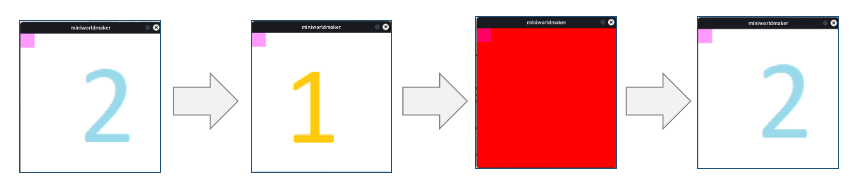
Beispiele
Zwischen verschiedenen Hintergründen wechseln:
from miniworlds import *

world = World()
actor = Actor()

world.add_background("images/1.png")
world.add_background((255, 0, 0, 255))
world.add_background("images/2.png")

@timer(frames = 40)
def switch():
    world.switch_background(0)

@timer(frames = 80)
def switch():
    world.switch_background(1)

@timer(frames = 160)
def switch():
    world.switch_background(2)

world.run()
Ausgabe:
- switch_world(new_world, reset=False)[Quellcode]#
Switch the active scene to another world.
- Rückgabetyp:
- Parameter:
new_world – The world that should become active.
reset – If True, the new world is reset before it starts.
- property tick_rate: int#
How often world logic runs relative to the frame loop.
A value of 1 runs game logic every frame. A value of 30 runs it every 30th frame.
Example
from miniworlds import World
world = World(120, 210) world.fps = 60 world.tick_rate = 3 world.run()
- to_pixel(position)[Quellcode]#
Converts a world position to a screen pixel position.
In PixelWorlds, this is an identity function. In TiledWorlds, override this.
- Rückgabetyp:
- Parameter:
position – World coordinate (x, y)
- Rückgabe:
Pixel coordinate (x, y)
Example
>>> world.to_pixel((5, 8))
(5, 8)