Appearance#
Appearance is the parent class of Background and Costume.
Backgrounds and costumes are appearances as well, so they inherit all attributes and methods defined in this class.
API Reference#
- class miniworlds.appearances.appearance.Appearance(*args, **kwargs)[source]#
Base class for actor costumes and world backgrounds.
Appearanceis the parent class of bothCostume(used by actors) andBackground(used by worlds). You normally do not createAppearanceinstances directly – access them throughactor.costumeorworld.backgroundinstead.Typical operations students use:
Loading an image:
actor.costume.add_image("my_image.png")Setting a fill color:
actor.costume.fill_color = (255, 0, 0)Drawing a border:
actor.costume.border = 2Animating a sprite:
actor.costume.is_animated = TrueMaking transparent:
actor.costume.alpha = 128Flipping horizontally:
actor.costume.is_flipped = True
Public Data Attributes:
Current font size used for text rendering.
Texture tile size used when is_textured is enabled.
Frames between animation steps.
If True, the image is tiled over the background.
If True, costume will be rotated with token direction
Whether drawing operations are centered on the parent position.
Whether shapes are rendered filled instead of outlined.
Flips the costume or background.
If True, the image will be upscaled remaining aspect-ratio.
Whether the image is scaled to parent width and keeps aspect ratio.
Whether the image is scaled to parent height and keeps aspect ratio.
Primary fill color for shape-based rendering.
Scales the token to parent-size without remaining aspect-ratio.
If True, the image will be rotated by parent orientation before it is rotated.
Defines a colored layer.
Defines a transparency.
Transparency value of the appearance.
If True, the costume will be animated.
->See fill color
see border color
border color of actor
The border-size of actor.
List of image surfaces managed by this appearance.
Performs all actions in image pipeline
Dirty flag for the current rendering pipeline state.
Implemented in subclasses Costume and Background
image_managerPublic Methods:
__init__()set_image(source)Sets the displayed image of costume/background to selected index
Finalize initialization after the metaclass constructor hook.
set_mode(**kwargs)Set multiple appearance mode flags at once.
Return all mode flags as a dictionary.
set_animated(value)Enable or disable frame-based animation.
flip(value)Convenience wrapper to set is_flipped.
Remove the most recently added image.
add_image(source)Add an image source and return its index.
add_images(sources)Adds multiple images to background/costume.
animate([loop])Animates the costume
the method is overwritten in subclasses costume and appearance
Create an array from costume or background.
from_array(arr)Create a background or costume from array.
fill(value)Set default fill color for borders and lines
set_filled(value)Set whether shapes are rendered filled.
get_color(position)Return the color at a local pixel position.
get_rect()Return the local rectangle of the rendered image.
draw(source, position, width, height)Draw an image source at a local position.
draw_on_image(path, position, width, height)Queue drawing an image file onto the appearance image.
draw_color_on_image(color, position, width, ...)Queue drawing a colored rectangle onto the appearance image.
__str__()Return str(self).
If dirty, the image will be reloaded.
update()Loads the next image, called 1/frame
register(method)Register method for decorator.
draw_shape_append(shape, arguments)Append a shape draw command to the render queue.
draw_shape_set(shape, arguments)Replace shape draw commands with a single command.
draw_image_append(surface, rect)Append a pre-rendered surface draw command.
draw_image_set(surface, rect)Replace image draw commands with one surface draw command.
set_dirty([value, status])Mark pipeline stages as dirty so the image is re-rendered.
Implemented in subclasses Costume and Background
Private Data Attributes:
_abc_implPrivate Methods:
_get_rendering_facade()_set_defaults(**kwargs)_set_font(font, font_size)_set_animation_speed(value)_set_textured(value)bool: If True, the image is tiled over the background.
_set_rotatable(value)If set to True, costume will be rotated with actor direction
_set_centered(value)_set_flipped(value)Flips the costume or background.
_set_filled(value)Sets whether the costume or background should be filled with a color.
_set_scaled(value)Sets the actor to parenz-size without remaining aspect-ratio.
_set_upscaled(value)If set to True, the image will be upscaled remaining aspect-ratio.
_set_scaled_to_width(value)_set_scaled_to_height(value)_set_image(source)Sets the displayed image of costume/background to selected index
_before_transformation_pipeline()Called in get_image before the image transformation pipeline is processed (e.g. when size, rotation, or other display properties have changed).
_after_transformation_pipeline()Called in get_image after the image transformation pipeline is processed (e.g. when size, rotation, or other display properties have changed).
_load_image()Loads the image,
_update_draw_shape()_inner_shape()Returns inner shape of costume
_outer_shape()Returns outer shape of costume
_inner_shape_arguments()Gets arguments for inner shape.
_outer_shape_arguments()Gets arguments for outer shape
- LOAD_NEW_IMAGE = 2#
- RELOAD_ACTUAL_IMAGE = 1#
- add_images(sources)[source]#
Adds multiple images to background/costume.
Each source in sources must be a valid input for add_image.
- after_animation()[source]#
the method is overwritten in subclasses costume and appearance
Examples
The actor will be removed after the animation - This can be used for explosions.
from miniworlds import *

world = World()
actor = Actor()
costume = actor.add_costume("images/1.png")
costume.add_image("images/2.png")
costume.animate()
@costume.register
def after_animation(self):
    self.parent.remove()

world.run()
- property alpha#
Transparency value of the appearance.
Use values from 0 to 255: - 0 means fully transparent - 255 means fully visible
If the value is between 0 and 1, it is interpreted as a normalized opacity and converted to the 0..255 range.
- animate(loop=False)[source]#
Animates the costume
- Parameters:
loop – If loop = True, the animation will be processed as loop. (you can stop this with self.loop)
from miniworlds import *

world = World(80,40)

robo = Actor()
robo.costume.add_images(["images/1.png"])
robo.costume.add_images(["images/2.png","images/3.png","images/4.png"])
robo.costume.animation_speed = 20
robo.costume.is_animated = True
world.run()
- property animation_speed#
Frames between animation steps.
- property border#
The border-size of actor.
The value is 0, if actor has no border
- Returns:
int
- Return type:
_type_
- property border_color#
border color of actor
- property color#
->See fill color
- property coloring#
Defines a colored layer.
coloring can be True or false. The color is defined by the attribute appearance.color.
- counter = 0#
- property dirty#
Dirty flag for the current rendering pipeline state.
- draw_color_on_image(color, position, width, height)[source]#
Queue drawing a colored rectangle onto the appearance image.
- draw_on_image(path, position, width, height)[source]#
Queue drawing an image file onto the appearance image.
- property fill_color#
Primary fill color for shape-based rendering.
- property font_size#
Current font size used for text rendering.
- from_array(arr)[source]#
Create a background or costume from array. The array must be a
numpy.ndarray,
which can be created with ``.to_colors_array
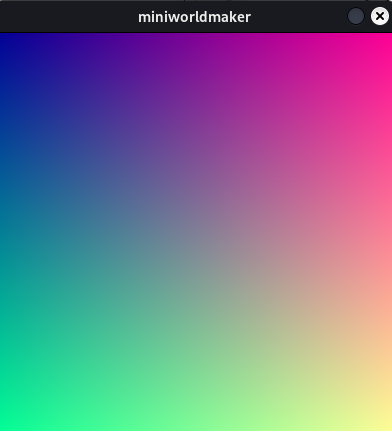
Examples
Convert grey default-background to gradient
from miniworlds import *

world = World()
arr = world.background.to_colors_array()
for x in range(len(arr)):
    for y in range(len(arr[0])):
        arr[x][y][0] = ((x +1 ) / world.width) * 255
        arr[x][y][1] = ((y +1 ) /world.width) * 255
world.background.from_array(arr)
world.run()


world.background.from_array(arr)
world.run()
Output:
- get_image()[source]#
If dirty, the image will be reloaded. The image pipeline will be processed, defined by “set_dirty”
- property image: Surface#
Performs all actions in image pipeline
- property images#
List of image surfaces managed by this appearance.
- property is_animated#
If True, the costume will be animated.
from miniworlds import *

world = World(80,40)

robo = Actor()
robo.costume.add_images(["images/1.png"])
robo.costume.add_images(["images/2.png","images/3.png","images/4.png"])
robo.costume.animation_speed = 20
robo.costume.is_animated = True
world.run()
- property is_centered#
Whether drawing operations are centered on the parent position.
- property is_filled#
Whether shapes are rendered filled instead of outlined.
- property is_flipped#
Flips the costume or background. The image is mirrored over the y-axis of costume/background.
Examples
Flips actor:
from miniworlds import *

world = World()
token = Token()
token.add_costume("images/alien1.png")
token.height= 400
token.width = 100
token.is_rotatable = False
@token.register
def act(self):
    if self.world.frame % 100 == 0:
        if self.costume.is_flipped:
            self.costume.is_flipped = False
        else:
            self.costume.is_flipped = True
world.run()


- property is_rotatable#
If True, costume will be rotated with token direction
- property is_scaled#
Scales the token to parent-size without remaining aspect-ratio.
- property is_scaled_to_height#
Whether the image is scaled to parent height and keeps aspect ratio.
- property is_scaled_to_width#
Whether the image is scaled to parent width and keeps aspect ratio.
- property is_textured#
If True, the image is tiled over the background.
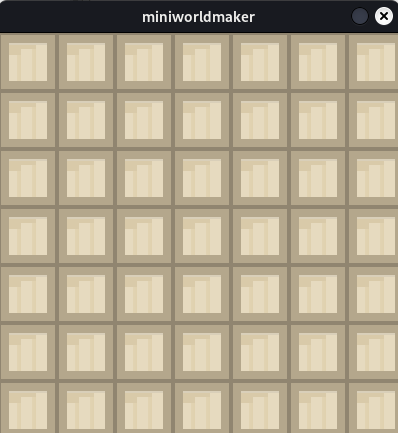
Examples
Texture the board with the given image:
from miniworlds import *

world = World()
background = world.add_background("images/stone.png")
background.is_textured = True
world.run()
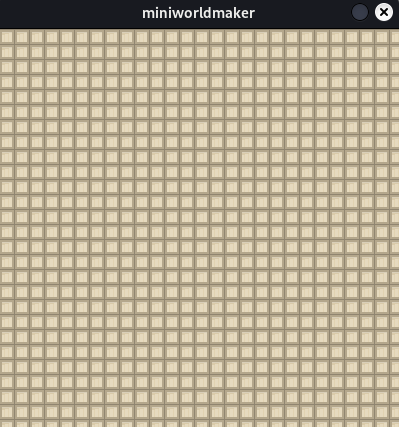
Set texture size
from miniworlds import *

world = World()
background = world.add_background("images/stone.png")
background.is_textured = True
background.texture_size = (15,15)
world.run()
- Type:
- property is_upscaled#
If True, the image will be upscaled remaining aspect-ratio.
- property orientation#
If True, the image will be rotated by parent orientation before it is rotated.
Examples
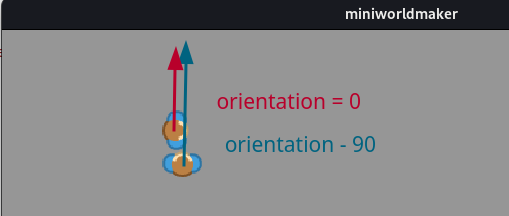
Both actors are moving up. The image of t2 is correctly aligned. t1 is looking in the wrong direction.
from miniworlds import *

world = TiledWorld()

t1 = Actor((4,4))
t1.add_costume("images/player.png")
t1.move()

t2 = Actor((4,5))
t2.add_costume("images/player.png")
t2.orientation = - 90
t2.move()

@t1.register
def act(self):
    self.move()

@t2.register
def act(self):
    self.move()

world.run()
- Type:
- set_dirty(value='all', status=1)[source]#
Mark pipeline stages as dirty so the image is re-rendered.
- set_image(source)[source]#
Sets the displayed image of costume/background to selected index
- Return type:
- Parameters:
source – The image index or an image.
- Returns:
True, if image index exists
Examples
Add two images two background and switch to image 2
from miniworlds import *

world = World()
background = world.add_background("images/1.png")
background.add_image("images/2.png")
background.set_image(1)
world.run()
- set_mode(**kwargs)[source]#
Set multiple appearance mode flags at once.
Supported keyword arguments include mode, texture_size, and animation_speed.
- property stroke_color#
see border color
- property texture_size#
Texture tile size used when is_textured is enabled.
- to_colors_array()[source]#
Create an array from costume or background. The array can be re-written to appearance with
.from_arrayExamples: :rtype:
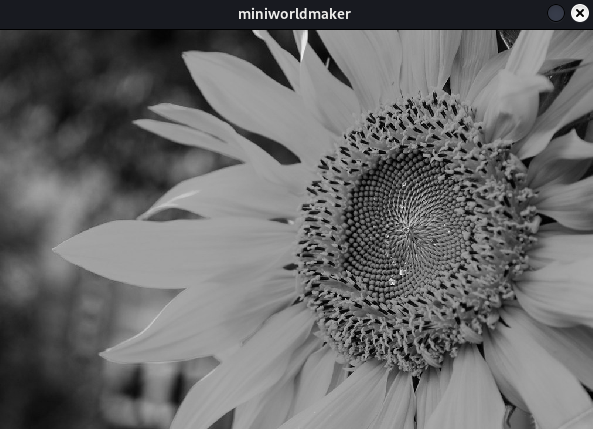
ndarrayConvert a background image to grayscale
from miniworlds import *

world = World(600,400)
world.add_background("images/sunflower.jpg")
arr = world.background.to_colors_array()

def brightness(r, g, b):
    return (int(r) + int(g) + int(b)) / 3

for x in range(len(arr)):
    for y in range(len(arr[0])):
        arr[x][y] = brightness(arr[x][y][0], arr[x][y][1], arr[x][y][2])

world.background.from_array(arr)
world.run()
Output:
- property transparency#
Defines a transparency.
If
transparency``is ``True, the che transparency value is defined by the attributeappearance.alpha