Actor#
Actors can communicate through messages when this is easier to read than passing object references around.
Combine send_message(...) with @register_message("...") for simple,
beginner-friendly event flows between actor classes.
API Reference#
- class miniworlds.actors.actor.Actor(position=(0, 0), *args, **kwargs)[source]#
Interactive object placed in a world.
Actors can move, detect collisions, send messages, and react to input and lifecycle events.
Examples
- Create a basic actor:
from miniworlds import World, Actor world = World(100, 60) Actor((10, 10), world=world) world.run()
- Create an actor with a costume:
from miniworlds import World, Actor world = World(100, 60) player = Actor((10, 10), world=world) player.add_costume(“images/player.png”) world.run()
See also
Actor API page
Shapes API page
Text actor API page
Public Data Attributes:
Current origin mode used for size and position operations.
collision_type specifies how collisions should be checked:
A actor with the property
is_blockablecannot move through actors with the propertyis_blocking.A actor with the property
is_blockablecannot move through actors with the propertyis_blocking.Defines the layer on which the actor is drawn if several actors overlap.
Actor position in last frame
Direction value from the previous frame.
Returns number of costumes of actor, 0 if actor has no costume
Whether the actor costume is mirrored on the horizontal axis.
Gets the costume of the actor, if available.
Gets the costume manager
Costume orientation offset in degrees.
Directions are handled exactly as in the Scratch programming language, see: Scratch Wiki
Gets the direction as value in unit circle (0° right, 90° top, 180° left...)
Size of the actor
The width of the actor in pixels.
The height of the actor in pixels.
The x-value of a actor
The y-value of a actor
Class name of this actor instance.
x-value of actor topleft-position
y-value of actor topleft-position
Top-left position of the actor in world coordinates.
x-value of actor center-position inside the current camera-screen
x-value of actor center-position
y-value of actor center-position
Center position of the actor in world coordinates.
Defines if the costume of a actor should be rotatable.
Should actor react to events? You can turn this option off for additional performance boost.
Fill color of the actor as RGBA tuple.
Fill color of the actor as RGBA tuple.
Is actor filled with color?
Border color as RGBA tuple.
Border color as RGBA tuple.
Border width of the actor.
Whether the actor is currently visible.
World this actor belongs to.
The image of the actor:
The position of the actor as Position(x, y)
Inherited from
ActorBasedirtyIf actor is dirty, it will be repainted.
rectThe surrounding Rectangle as pygame.Rect.
position_managersensor_managercostume_managerInherited from
DirtySpritevisibleYou can make this sprite disappear without removing it from the group assign 0 for invisible and 1 for visible
layerLayer property can only be set before the sprite is added to a group, after that it is read only and a sprite's layer in a group should be set via the group's change_layer() method.
Inherited from
SpriteimagerectlayerDynamic, read only property for protected _layer attribute.
Public Methods:
__init__([position])switch_origin(value)Switch actor origin while preserving the visual on-screen position.
create_on_world(world)Creates a actor to a specific world
from_topleft(topleft_position, *args, **kwargs)Create an actor whose origin is interpreted as top-left.
from_center(center_position, *args, **kwargs)Create an actor whose origin is interpreted as center.
flip_x()Flips the actor by 180° degrees.
add_costume([source])Adds a new costume to actor.
add_costumes(sources)Adds multiple costumes
remove_costume([source])Removes a costume from actor
switch_costume(source)Switches the costume of actor
set_costume(costume)Set the current costume from an index, source, or appearance object.
Remove all costumes and reset appearance state.
set_background_color(color)Set a background color behind the actor costume image.
Switches to the next costume of actor
Return True when the actor currently has a costume.
turn_left([degrees])Turns actor by degrees degrees left :rtype:
intturn_right([degrees])Turns actor by degrees degrees right
set_direction(direction)Actor points in given direction.
point_towards_position(destination)Actor points towards a given position
point_towards_actor(other)Actor points towards another actor.
set_size(value)Set actor size as (width, height) in pixels.
scale_width(value)Scale actor width by a factor.
scale_height(value)Scale actor height by a factor.
move([distance, direction])Moves actor distance steps in current direction
move_vector(vector)Moves actor in direction defined by the vector
move_back(distance)Moves the actor backward by distance steps (opposite of current direction).
Undo the last move.
move_towards(target)Move one step toward a target actor or position.
move_in_direction(direction[, distance])Moves actor distance steps into a direction or towards a position
move_to(position)Moves actor distance to a specific world_posiition
remove([kill])Removes this actor from world
Hook called immediately before the actor is removed from the world.
bounce_from_border(borders)The actor "bounces" from a border.
detect_all([actors, direction, distance])Detects if actors are on actor position.
detect(*args, **kwargs)Detects if actors are on actor position.
detect_borders([distance])Detects borders
Does the actor touch the left border?
Does the actor touch the right border?
Does the actor touch the top border?
Does the actor touch the lower border?
detect_color([color])Detects colors in world-background at actor center-position
detect_color_at([direction, distance])Detects colors in world-background at actor-position
detect_actors_at([direction, distance, actors])Detects a actor in given direction and distance.
detect_actor_at([direction, distance, actors])Detect and return the first actor at a given direction and distance.
detect_actors_in_front([actors, distance])Detect all actors directly in front of this actor.
detect_actor_in_front([actors, distance])Detect and return the first actor directly in front.
detect_point(position)Is the actor colliding with a specific (global) point?
detect_pixel(position)Is the actor colliding with a pixel?
detect_rect(rect)Is the actor colliding with a static rect?
Checks whether the actor is completely inside the world boundaries.
bounce_from_actor(other)Reflect movement direction when colliding with another actor.
animate([speed])Animate the current costume with the given speed.
animate_costume(costume[, speed])Animate a specific costume with the given speed.
animate_loop([speed])Animates a costume with a looping animation
Stops current animation.
send_message(message)Sends a message to world.
on_key_down(key)Called once when a key is pressed.
on_key_pressed(key)Called repeatedly every frame while a key is held down.
on_key_up(key)Called once when a previously pressed key is released.
on_mouse_over(position)Called when the mouse cursor enters or moves over the actor area.
on_mouse_leave(position)Called when the mouse cursor leaves the actor area.
on_mouse_left_down(position)Called when the left mouse button is pressed down.
on_mouse_right_down(position)Called when the right mouse button is pressed down.
on_mouse_left(position)Called when the left mouse button is clicked.
on_mouse_right(position)Called when the right mouse button is clicked.
on_mouse_motion(position)Called when the mouse moves.
on_mouse_left_released(position)Method is called when left mouse key is released.
on_mouse_right_released(position)Method is called when right mouse key is released.
on_clicked_left(position)The mouse is on top of a actor and mouse was clicked.
on_clicked_right(position)The mouse is on top of a actor and mouse was clicked.
on_detecting_world is called, when actor is on the world
Called when the actor is not touching the world (i.e. outside world bounds).
on_detecting_actor(actor)on_detecting_actor is called, when actor is detects a actor on same position
on_detecting_borders(borders)on_detecting_border is called, when actor is near a border
fill(value)Set fill color for borders and lines
hide()Hides a actor (the actor will be invisible)
show()Displays a actor ( an invisible actor will be visible)
register_sensor(*args, **kwargs)This method is used for the @register_sensor decorator.
Return actor rect in camera-local coordinates.
set_world(new_world)Move the actor to another world and return the actor.
Create and attach a new empty costume to this actor.
set_position(value)Set actor position in world coordinates.
get_distance_to(obj)Gets the distance to another actor or a position
Hook called when actor shape-related properties change.
Inherited from
ActorBaseregister(method[, force, name])This method is used for the @register decorator.
register_message(*args, **kwargs)Registers a method to an object to handle specific on_message events.
__str__()Return str(self).
get_costume_class()Inherited from
DirtySprite__init__(*groups)__repr__()Return repr(self).
Inherited from
Sprite__init__(*groups)add(*groups)add the sprite to groups
remove(*groups)remove the sprite from groups
add_internal(group)For adding this sprite to a group internally.
remove_internal(group)For removing this sprite from a group internally.
update(*args, **kwargs)method to control sprite behavior
kill()remove the Sprite from all Groups
groups()list of Groups that contain this Sprite
alive()does the sprite belong to any groups
__repr__()Return repr(self).
Private Data Attributes:
_abc_impl__image__rectInherited from
ActorBase_abc_implPrivate Methods:
_get_initialization_facade()_get_appearance_facade()_get_event_facade()_get_sensor_facade()_get_movement_facade()_get_size_facade()_validate_arguments(position, *args, **kwargs)Inherited from
ActorBase_is_actor_repainted()Inherited from
DirtySprite_set_visible(val)set the visible value (0 or 1) and makes the sprite dirty
_get_visible()return the visible value of that sprite
- add_costume(source=None)[source]#
Adds a new costume to actor. The costume can be switched with self.switch_costume(index)
- Return type:
- Parameters:
source – Path to the first image of new costume or Tuple with color-value
Examples
Add first costume from image:
from miniworlds import *

world = World(100,60))
actor = Actor((10,10))
costume = actor.add_costume("images/player.png")

world.run()
Output:

Add first costume from color:
from miniworlds import *

world = World(100,60))
actor = Actor((10,10))
costume = actor.add_costume((255,255,0))

world.run()
Output:
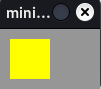
Create two costumes and switch between costumes
from miniworlds import *

world = World(100,60))
actor = Actor((10,10))
world.speed = 30
costume1 = actor.add_costume((255,255,0))
costume2 = actor.add_costume((255,0,255))
@actor.register
def act(self):
    if self.costume == costume1:
        self.switch_costume(costume2)
    else:
        self.switch_costume(costume1)

world.run()
Output:

- Returns:
The new costume.
- animate_loop(speed=10)[source]#
Animates a costume with a looping animation
Switches through all costume-images every
speed-frame.Examples
from miniworlds import *

world = World(columns=280, rows=100)
robo = Actor(position=(0, 0))
robo.costume.add_images(["images/1.png", "images/2.png","images/3.png","images/4.png"])
robo.size = (99, 99)
robo.animate_loop()
world.run()
- Parameters:
speed (int, optional) – Every
speedframe, the image is switched. Defaults to 10.
- property border#
Border width of the actor.
A value of 0 means no border.
Notes
You can also configure borders via costume.border or world.default_border.
- property border_color#
Border color as RGBA tuple.
Notes
Set Actor.border to a value greater than 0 for a visible border.
Alias: Actor.stroke_color.
- bounce_from_border(borders)[source]#
The actor “bounces” from a border.
The direction is set according to the principle input angle = output angle. :rtype:
ActorNote
You must check for borders first!
- Parameters:
borders – A list of borders as strings e.g. [“left”, “right”]
Examples
from miniworlds import *
import random

world = World(150, 150)
actor = Actor((50,50))
actor.add_costume("images/ball.png")
actor.direction = 10

@actor.register
def act(self):
    self.move()
    borders = self.detecting_borders()
    if borders:
        self.bounce_from_border(borders)

world.run()
Output:
- Returns:
The actor
- property collision_type: str#
collision_type specifies how collisions should be checked:
default: tile for Tiledworlds, ‘mask’ for Pixelworlds
tile: Are actors on the same tile? (only TiledWorld)
rect: Are actors colliding when checking their bounding - boxes? (Only PixelWorld)
static-rect: Are actors colliding when checking circle with radius = bounding-box-radius.(Only PixelWorld)
circle: Are actors colliding when checking circle with radius = bounding-box-radius.(Only PixelWorld)
mask: Are actors colliding when checking if their image masks are overlapping.
- property color#
Fill color of the actor as RGBA tuple.
Setting this value also enables filling on the costume.
Notes
Alias: Actor.color
Filling an image costume replaces the visible image content.
- property costume_count: int#
Returns number of costumes of actor, 0 if actor has no costume
Examples
Add costume and count costumes
from miniworlds import *
world = World()
actor = Actor()
initial_count = actor.costume_count  # 0
actor.add_costume((255,0,0,0))
final_count = actor.costume_count  # 1
world.run()
- Returns:
Number of costumes currently attached to the actor.
- Return type:
- property costumes: CostumesManager#
Gets the costume manager
The costume manager can be iterated to get all costumes
- classmethod create_on_world(world)[source]#
Creates a actor to a specific world
overwritten in subclasses
- detect(*args, **kwargs)[source]#
Detects if actors are on actor position. Returns the first found actor.
- Return type:
- Parameters:
actors – filter by actor type. Enter a class_name of actors to look for heredirection: int = 0, distance: int = 0
direction – The direction in which actors should be detected.
distance – The distance in which actors should be detected (Start-Point is actor.center)
- Returns:
First actor found by Sensor
Examples
The green robot pushes the yellow robot:
from miniworlds import *

world = TiledWorld(8,3)
actor = Actor((1,1))
actor.add_costume("images/robo_green.png")
actor.orientation = -90
actor.direction = 90

actor2 = Actor((4,1))
actor2.add_costume("images/robo_yellow.png")
actor2.orientation = -90
actor2.direction = -90

@actor.register
def act(self):
    self.move()
    actor = self.detecting_actor()
    if actor:
        actor.move_right()
world.run()
Output:
- detect_actor_at(direction=None, distance=0, actors=None)[source]#
Detect and return the first actor at a given direction and distance.
- Return type:
- detect_actor_in_front(actors=None, distance=1)[source]#
Detect and return the first actor directly in front.
- Return type:
- detect_actors_at(direction=None, distance=0, actors=None)[source]#
Detects a actor in given direction and distance.
Examples
from miniworlds import *
world = World()
wall=Rectangle((200,0))
wall.size = (20, 400)

for i in range(7):
    actor = Circle((10,i*60 + 20))
    actor.range = i * 10
    @actor.register
    def act(self):
        if not self.detect_actors_at(self.direction, self.range):
            self.direction = "right"
            self.move()

world.run()
- Parameters:
direction – The direction in which actors should be detected.
distance – The distance in which actors should be detected (Start-Point is actor.center)
- Return type:
- Returns:
A list of actors
- detect_actors_in_front(actors=None, distance=1)[source]#
Detect all actors directly in front of this actor.
- Return type:
- detect_all(actors=None, direction=0, distance=0)[source]#
Detects if actors are on actor position. Returns a list of actors.
- Return type:
- Parameters:
actors – filter by actor type. Enter a class_name of actors to look for here
direction – The direction in which actors should be detected.
distance – The distance in which actors should be detected (Start-Point is actor.center)
- Returns:
All actors found by Sensor
- detect_borders(distance=0)[source]#
Detects borders
Args: :rtype:
Listdistance: Specifies the distance in front of the actuator to which the sensors reacts.
- Returns:
True if border was found.
- detect_color(color=None)[source]#
Detects colors in world-background at actor center-position
- Return type:
- Parameters:
color – color as tuple
- Returns:
True, if color was found
- detect_color_at(direction=None, distance=0)[source]#
Detects colors in world-background at actor-position
- detect_left_border()[source]#
Does the actor touch the left border?
- Return type:
- Returns:
True if border was found.
- detect_pixel(position)[source]#
Is the actor colliding with a pixel?
- Return type:
- Returns:
True if pixel is below actor
- detect_point(position)[source]#
Is the actor colliding with a specific (global) point?
- Return type:
Warning
If your want to check if an actor detects a specific pixel, use detect_pixel
- Returns:
True if point is below actor
- detect_right_border()[source]#
Does the actor touch the right border?
- Return type:
- Returns:
True if border was found.
- detect_top_border()[source]#
Does the actor touch the top border?
- Return type:
- Returns:
True if border was found.
- detecting_bottom_border()[source]#
Does the actor touch the lower border?
- Return type:
- Returns:
True if border was found.
- property direction: int#
Directions are handled exactly as in the Scratch programming language, see: Scratch Wiki
The default direction is
0°. All actors are looking"up"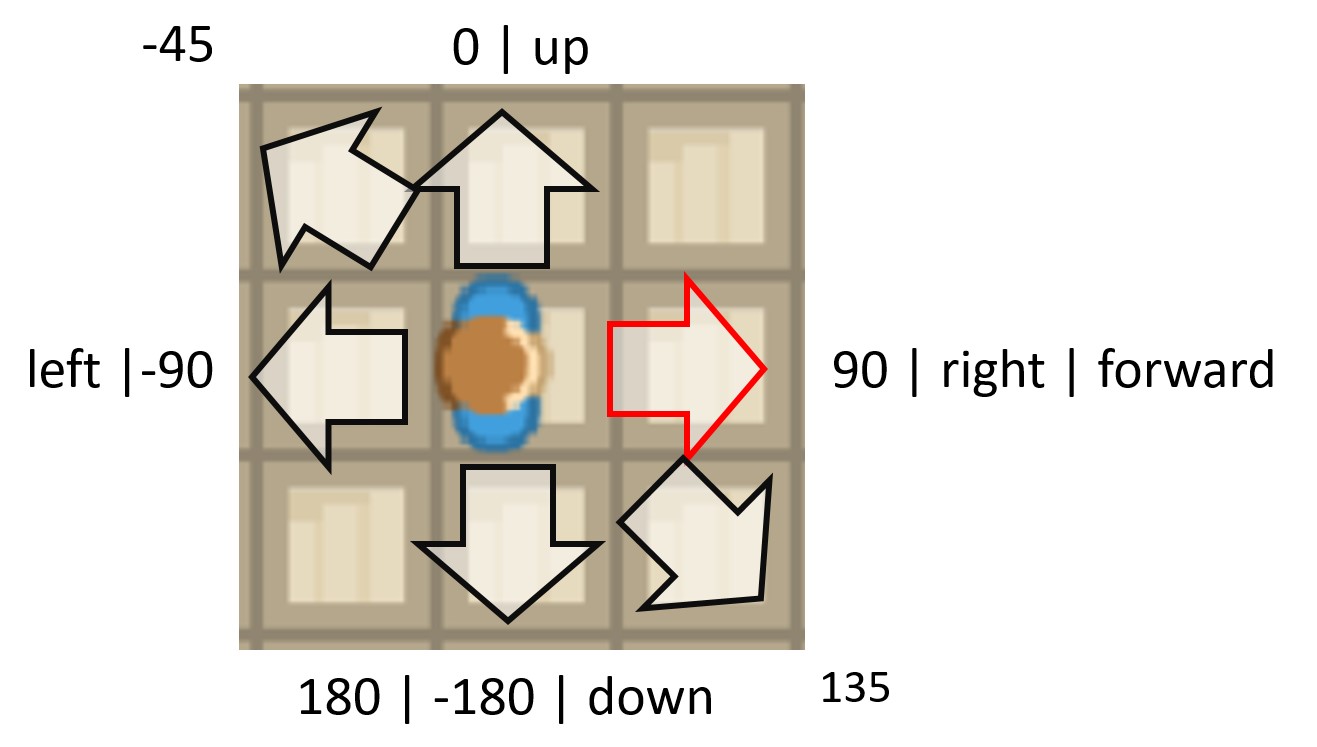
Values for Direction
0°or"up": up90°or"right": Move right-90°or"left": Move left180°or"down": Move down"forward": Current direction
Sets direction of the actor.
You can use an integer or a string to describe the direction
- Options
0,"up"- Look up90,"right", - Look right-90,"left", - Look left-180,180,"down"- Look down
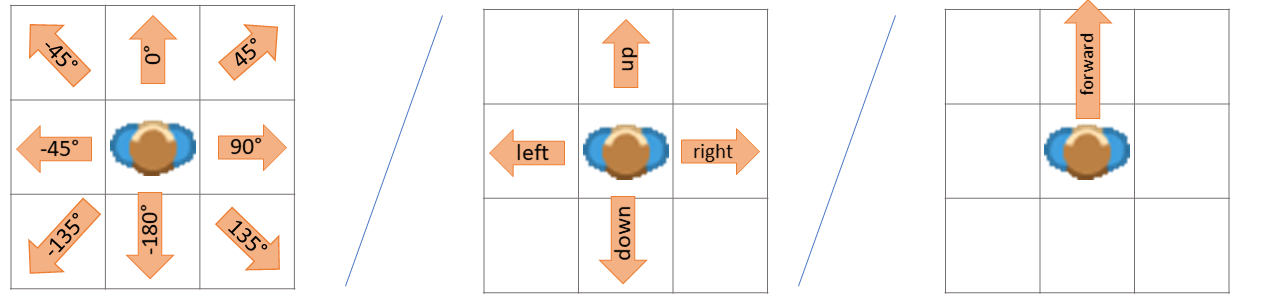
Examples
Move in a direction with WASD-Keys
def on_key_down(self, keys):
    if "W" in keys:
        self.direction = "up"
    elif "S" in keys:
        self.direction = "down"
    elif "A" in keys:
        self.direction = "left"
    elif "D" in keys:
        self.direction = "right"
    self.move()
Move 45°:
from miniworlds import *

world = World(100, 100)
c = Circle ((50,50), 10)

@c.register
def act(self):
    c.direction = 45
    c.move()

world.run()
Move -45°:
from miniworlds import *

world = World(100, 100)
c = Circle ((50,50), 10)

@c.register
def act(self):
    c.direction = -45
    c.move()

world.run()
- property direction_at_unit_circle: int#
Gets the direction as value in unit circle (0° right, 90° top, 180° left…)
- property fill_color#
Fill color of the actor as RGBA tuple.
Setting this value also enables filling on the costume.
Notes
Alias: Actor.color
Filling an image costume replaces the visible image content.
- flip_x()[source]#
Flips the actor by 180° degrees. The costume is flipped and the actor’s direction changed by 180 degrees. :rtype:
int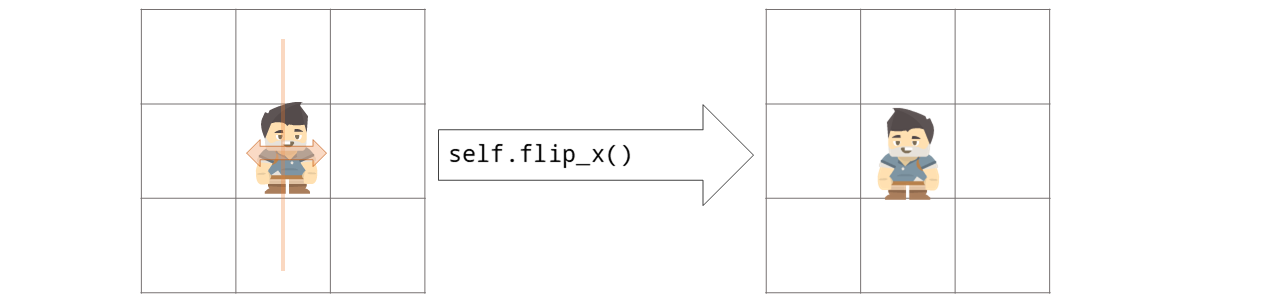
Examples
Flip a actor in Example flipthefish.py
from miniworlds import *

world=TiledWorld()
world.columns = 4
world.rows = 1
world.add_background("images/water.png")
fish = Actor()
fish.border = 1
fish.add_costume("images/fish.png")
fish.direction = "right"
fish.orientation = -90
@fish.register
def act(self):
    self.move()

@fish.register
def on_not_detecting_world(self):
    self.move_back()
    self.flip_x()

world.run()
Output:
- classmethod from_center(center_position, *args, **kwargs)[source]#
Create an actor whose origin is interpreted as center.
- classmethod from_topleft(topleft_position, *args, **kwargs)[source]#
Create an actor whose origin is interpreted as top-left.
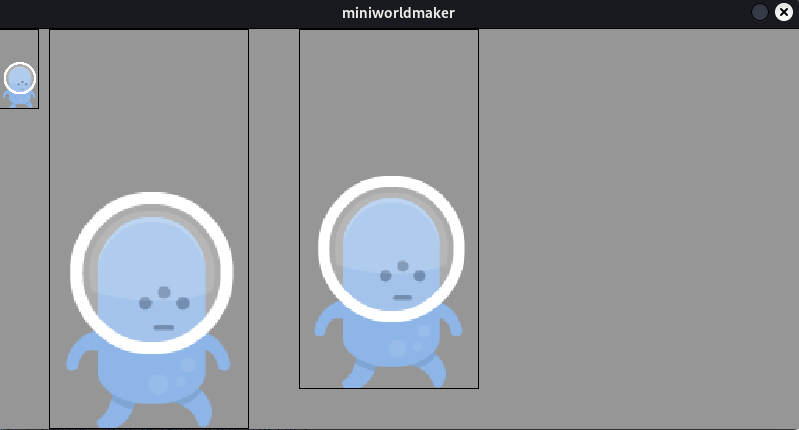
- property height#
The height of the actor in pixels.
When the height of a actor is changed, the width is scaled proportionally.
Examples
Create a actor and scale width/height proportionally:
from miniworlds import *

world = World(800,400)

def create_actor(x, y):
t = Actor()
t.position = (x, y)
t.add_costume("images/alien1.png")
t.border = 1
return t

t0 = create_actor(0,0)
t1 = create_actor(50,0)
t1.height = 400
t2 = create_actor(300,0)
t2.width = 180

world.run()
- property image: Surface#
The image of the actor:
Warning
Warning: You should not directly draw on the image (with pygame functions) as the image will be reloaded during animations
- property is_blockable#
A actor with the property
is_blockablecannot move through actors with the propertyis_blocking.
- property is_blocking#
A actor with the property
is_blockablecannot move through actors with the propertyis_blocking.
- property is_filled#
Is actor filled with color?
- is_inside_world()[source]#
Checks whether the actor is completely inside the world boundaries.
- Returns:
True if the entire actor rectangle is within the world, False otherwise.
- property is_rotatable: bool#
Defines if the costume of a actor should be rotatable. The actor can still be rotated with the
directionproperty, but its costume won’t be changedNote
You can also use
actor.costume.is_rotatableExamples
Create a rotatable and a not rotatable actor
from miniworlds import *
world = World()

t1 = Actor((100,100))
t1.add_costume("images/alien1.png")

t2 = Actor((200,200))
t2.add_costume("images/alien1.png")
t2.is_rotatable = False

@t1.register
def act(self):
    self.move()
    self.direction += 1

@t2.register
def act(self):
    self.move()
    self.direction += 1

world.run()
Output:
- property last_position: Tuple[float, float]#
Actor position in last frame
Can be used to track changes.
- property local_center: Tuple[float, float]#
x-value of actor center-position inside the current camera-screen
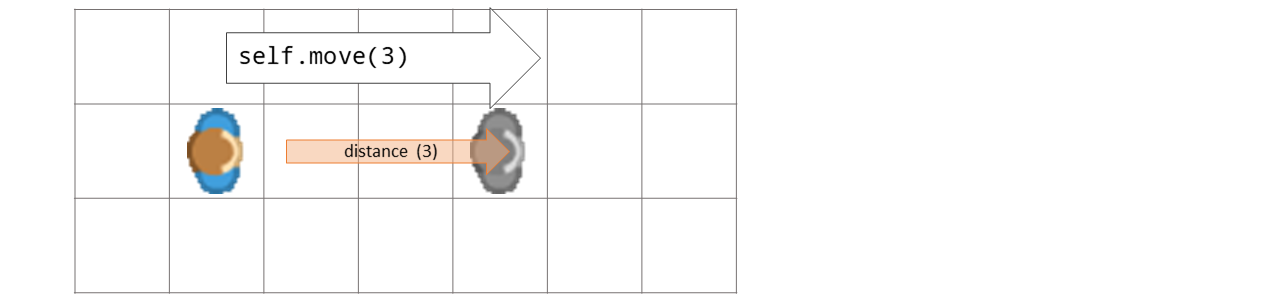
- move(distance=0, direction=0)[source]#
Moves actor distance steps in current direction
- Parameters:
distance – Number of steps to move. If distance = 0, the actor speed will be used.
- Returns:
The moved actor
Examples
if actor is on the world, move forward:
class Robot(Actor):

    def act(self):
        if self.detecting_world():
            self.move()
- move_back(distance)[source]#
Moves the actor backward by distance steps (opposite of current direction).
- Parameters:
distance – Number of steps to move backward.
- Returns:
The actor itself.
Examples
Move back when wall is detected:
def act(self):
    self.move()
    if self.detect(Wall):
        self.move_back(5)
- move_in_direction(direction, distance=1)[source]#
Moves actor distance steps into a direction or towards a position
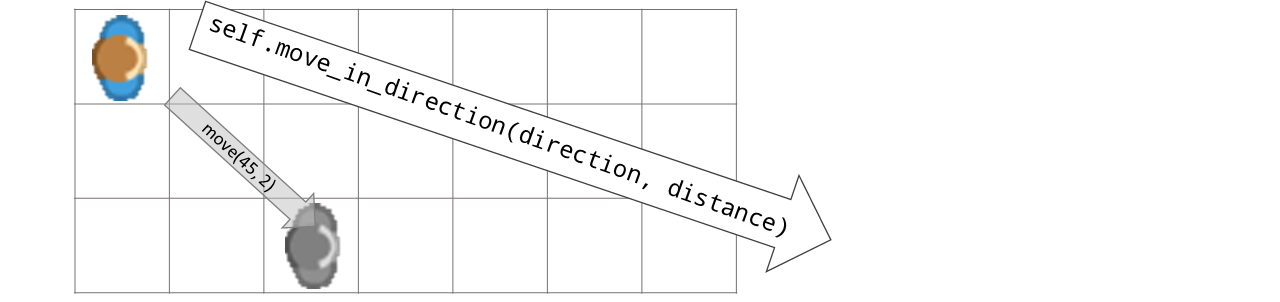
- Options
0, “up” - Look up
90, “right”, - Look right
-90, “left”, - Look left
-180, 180, “down” - Look down
- Parameters:
direction – Direction as angle
distance – Detects obj “distance” steps in front of current actor.
- Returns:
The actor itself
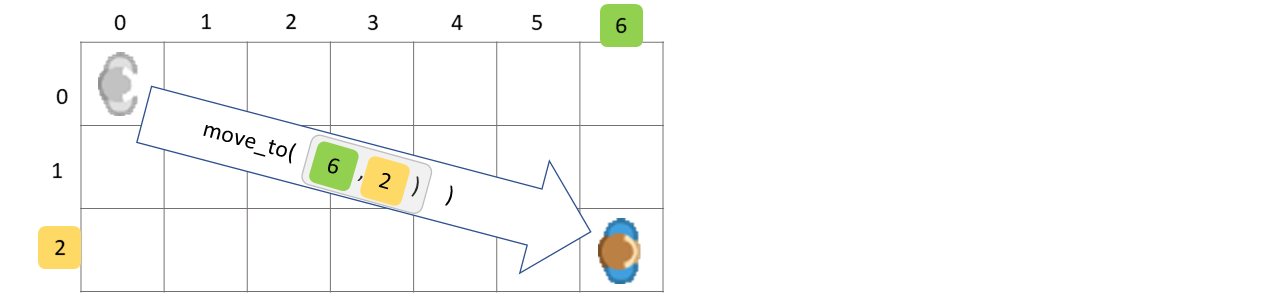
- move_to(position)[source]#
Moves actor distance to a specific world_posiition
- Parameters:
position – The position to which the actor should move. The position can be a 2-tuple (x, y)
world_position (which will be converted to a)
- Returns:
The actor itself
Examples
move to (3, 2) on mouse_click
def on_clicked_left(self, position):
    self.move_to((3,2))
- move_vector(vector)[source]#
Moves actor in direction defined by the vector
- Returns:
The moved actor
- on_clicked_left(position)[source]#
The mouse is on top of a actor and mouse was clicked.
Examples
Registering a on_click event:
actor = miniworlds.Actor((2,2))

@actor.register
def on_clicked_left(self, position):
    # Handle click event
- Parameters:
position (tuple) – Actual mouse position as tuple (x,y)
- Raises:
NotImplementedOrRegisteredError – The error is raised when method is not overwritten or registered.
- on_clicked_right(position)[source]#
The mouse is on top of a actor and mouse was clicked.
Examples
Registering a on_click event:
actor = miniworlds.Actor((2,2))

@actor.register
def on_clicked_right(self, position):
    # Handle right click event
- Parameters:
position (tuple) – Actual mouse position as tuple (x,y)
- Raises:
NotImplementedOrRegisteredError – The error is raised when method is not overwritten or registered.
- on_detecting_actor(actor)[source]#
on_detecting_actor is called, when actor is detects a actor on same position
- Parameters:
actor (Actor) – The found actor
Examples
Register detect_actor event
@player.register
def on_detecting_actor(self, actor):
    # Check if detected actor is the target
    if actor == player2:
        self.move()  # React to detection
- Raises:
NotImplementedOrRegisteredError – The error is raised when method is not overwritten or registered.
- on_detecting_borders(borders)[source]#
on_detecting_border is called, when actor is near a border
- Parameters:
borders (List) – A list of strings with found borders, e.g.: [‘left’, ‘top’]
Examples
Register on_detecting_border_event:
@player.register
def on_detecting_borders(self, borders):
    # Handle border detection
    if "left" in borders:
        self.x = 1  # Move away from left edge
- Raises:
NotImplementedOrRegisteredError – The error is raised when method is not overwritten or registered.
- on_detecting_world()[source]#
on_detecting_world is called, when actor is on the world
Examples
Register on_detecting_world method:
@player.register
    def on_detecting_world(self):
        # Actor is inside the world
- Raises:
NotImplementedOrRegisteredError – The error is raised when method is not overwritten or registered.
- on_key_down(key)[source]#
Called once when a key is pressed.
Register
on_key_down_<letter>(for exampleon_key_down_a) if you want to react to a specific letter only.For arrow keys use
on_key_down_left,on_key_down_right,on_key_down_up,on_key_down_down.- Parameters:
key – List of key name variants, for example
['A', 'a']or['left']for the left arrow key.
Examples
Move with WASD keys:
@player.register
def on_key_down(self, key):
    if 'W' in key or 'up' in key:
        self.direction = 'up'
    elif 'S' in key or 'down' in key:
        self.direction = 'down'
    elif 'A' in key or 'left' in key:
        self.direction = 'left'
    elif 'D' in key or 'right' in key:
        self.direction = 'right'
    self.move()
Or use dedicated per-key handlers for arrow keys:
@player.register
def on_key_down_left(self):
    self.direction = 'left'
    self.move()

@player.register
def on_key_down_right(self):
    self.direction = 'right'
    self.move()

@player.register
def on_key_down_up(self):
    self.direction = 'up'
    self.move()

@player.register
def on_key_down_down(self):
    self.direction = 'down'
    self.move()
- on_key_pressed(key)[source]#
Called repeatedly every frame while a key is held down.
This is the right choice for smooth, continuous movement. Like
on_key_down, this event supports per-letter handlers such ason_key_pressed_woron_key_pressed_leftfor the left arrow key.- Parameters:
key – List of key name variants currently held, for example
['W', 'w']or['up'].
Examples
Smooth movement with arrow keys (fires every frame while held):
@player.register
def on_key_pressed(self, key):
    if 'left' in key:
        self.x -= 3
    elif 'right' in key:
        self.x += 3
    elif 'up' in key:
        self.y -= 3
    elif 'down' in key:
        self.y += 3
- on_key_up(key)[source]#
Called once when a previously pressed key is released.
- Parameters:
key – List of key name variants, same format as in
on_key_down.
Examples
@player.register
def on_key_up(self, key):
    if 'space' in key:
        player.stop_animation()
- on_mouse_leave(position)[source]#
Called when the mouse cursor leaves the actor area.
- Parameters:
position – The mouse position when it left the actor.
Examples
@actor.register
def on_mouse_leave(self, position):
    self.costume.transparency = 0  # restore normal look
- on_mouse_left(position)[source]#
Called when the left mouse button is clicked.
The event is triggered for the click itself, independent of whether the click happened on the actor. Use detect_pixel(position) if you only want clicks on the actor body.
- Parameters:
position – Current mouse position as (x, y).
- on_mouse_left_released(position)[source]#
Method is called when left mouse key is released.
Examples
You can use on_mouse_left_release to implement a drag_and_drop event
from miniworlds import *

world = World(200, 200)
circle = Circle((30, 30), 60)
circle.direction = 90
circle.dragged = False

@circle.register
def on_mouse_left(self, mouse_pos):
    if self.detect_pixel(mouse_pos):
        self.dragged = True

@circle.register
def on_mouse_left_released(self, mouse_pos):
    if not world.is_mouse_pressed():
        self.dragged = False
        self.center = mouse_pos

world.run()
Output:
- Parameters:
position (tuple) – Actual mouse position as tuple (x,y)
- Raises:
NotImplementedOrRegisteredError – The error is raised when method is not overwritten or registered.
- on_mouse_motion(position)[source]#
Called when the mouse moves.
The event is triggered for movement events in general. Use detect_pixel(position) if you only want motion over the actor body.
- Parameters:
position – Current mouse position as (x, y).
- on_mouse_over(position)[source]#
Called when the mouse cursor enters or moves over the actor area.
- Parameters:
position – Current mouse position as
(x, y).
Examples
@actor.register
def on_mouse_over(self, position):
    self.costume.transparency = 100  # semi-transparent on hover
- on_mouse_right(position)[source]#
Called when the right mouse button is clicked.
Use detect_pixel(position) if you only want clicks on the actor body.
- Parameters:
position – Current mouse position as (x, y).
- on_mouse_right_released(position)[source]#
Method is called when right mouse key is released.
The behavior and arguments match on_mouse_left_released.
- Parameters:
position (tuple) – Actual mouse position as tuple (x,y)
- Raises:
NotImplementedOrRegisteredError – The error is raised when method is not overwritten or registered.
- on_not_detecting_world()[source]#
Called when the actor is not touching the world (i.e. outside world bounds).
Useful to remove actors that fly off-screen.
Examples
Remove actor when it leaves the world:
@rocket.register
def on_not_detecting_world(self):
    self.remove()
- Raises:
NotImplementedOrRegisteredError – The error is raised when method is not overwritten or registered.
- property origin#
Current origin mode used for size and position operations.
- point_towards_actor(other)[source]#
Actor points towards another actor.
- Return type:
- Parameters:
other – The other actor
- Returns:
The new direction
- point_towards_position(destination)[source]#
Actor points towards a given position
- Return type:
- Parameters:
destination – The position to which the actor should pointing
- Returns:
The new direction
Examples
Point towards mouse_position:
def act(self):
    mouse = self.world.mouse.get_position()
if mouse:
    self.point_towards_position(mouse)
self.move()
- remove(kill=True)[source]#
Removes this actor from world
Examples: :rtype:
defaultdictRemoves robots in thecrash.py :
def act(self):
    self.move()
    other = self.detecting_actor(distance = 0, actor_type=Robot)
if other:
    explosion = Explosion(position=self.position)
    self.remove()
    other.remove()
- remove_costume(source=None)[source]#
Removes a costume from actor
- Parameters:
source – The index of the new costume or costume-object. Defaults to actual costume
- send_message(message)[source]#
Sends a message to world.
The message can be received with the
on_message-eventExamples
Send and receive messages:
from miniworlds import *

world = World()

actor1 = Actor((2, 2))
actor1.add_costume((100,0,100,100))

@actor1.register
def on_message(self, message):
    # Handle the message received
    self.send_message(f"got: {message}")

actor2 = Actor((100,100))
actor2.send_message("Hello from actor2")

@actor2.register
def on_key_down_s(self):
    self.send_message("Hello")
world.run()
- Parameters:
message (str) – A string containing the message.
- set_direction(direction)[source]#
Actor points in given direction.
You can use a integer or a string to describe the direction
- Return type:
- Parameters:
string (The direction as integer or)
- Options
0,"up"- Look up90,"right", - Look right-90,"left", - Look left-180,180,"down"- Look down
Examples
Move in a direction with WASD-Keys
def on_key_down(self, keys):
    if "W" in keys:
        self.direction = "up"
    elif "S" in keys:
        self.direction = "down"
    elif "A" in keys:
        self.direction = "left"
    elif "D" in keys:
        self.direction = "right"
    self.move()
- property static#
Should actor react to events? You can turn this option off for additional performance boost.
- stop_animation()[source]#
Stops current animation. Costume
is_animatedis set to FalseExamples
from miniworlds import *

world = World(columns=280, rows=100)
robo = Actor(position=(0, 0))
robo.costume.add_images(["images/1.png", "images/2.png","images/3.png","images/4.png"])
robo.size = (99, 99)
robo.animate_loop()
@timer(frames = 100)
def stop():
    robo.stop_animation()
world.run()
- property stroke_color#
Border color as RGBA tuple.
Notes
Set Actor.border to a value greater than 0 for a visible border.
Alias: Actor.stroke_color.
- switch_costume(source)[source]#
Switches the costume of actor
- Return type:
- Parameters:
source – Number of costume or Costume object
Examples
Switch a costume:
from miniworlds import *

world = World(100,60)
t = Actor()
costume =t1.add_costume("images/1.png")
t.add_costume("images/2.png")
t.switch_costume(1)

@timer(frames = 40)
def switch():
    t1.switch_costume(0)

world.run()
- Returns:
The new costume
- turn_left(degrees=90)[source]#
Turns actor by degrees degrees left :rtype:
int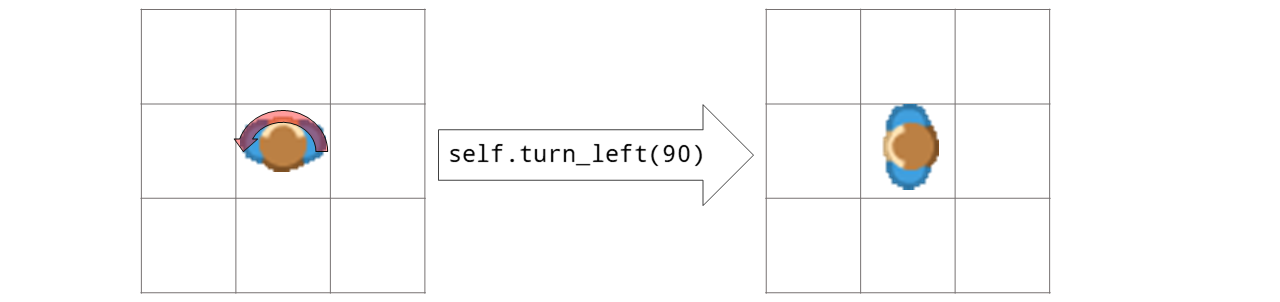
- Options:
You can set the value actor.is_rotatable = False if you don’t want the actor to be rotated.
Examples
from miniworlds import *

world = World(100, 100)
t = Actor()
t.add_costume("images/arrow.png")
t.size = (100,100)

@t.register
def act(self):
    t.turn_left(1)

world.run()
Output:
- Parameters:
degrees – degrees in left direction
- Returns:
New direction
- turn_right(degrees=90)[source]#
Turns actor by degrees degrees right
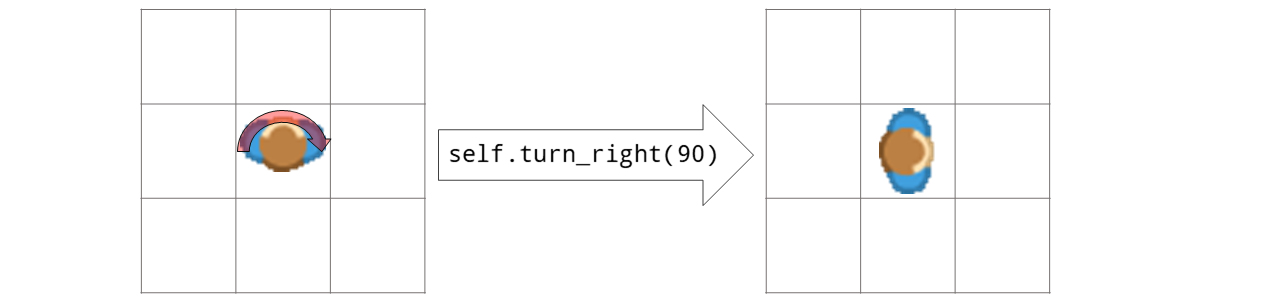
Examples
from miniworlds import *

world = World(100, 100)
t = Actor()
t.add_costume("images/arrow.png")
t.size = (100,100)

@t.register
def act(self):
    t.turn_left(1)

world.run()
Output:
- Options:
You can set the value actor.is_rotatable = False if you don’t want the actor to be rotated.
- Parameters:
degrees – degrees in left direction
- Returns:
New direction
- undo_move()[source]#
Undo the last move. Moves the actor to the last position and resets direction.
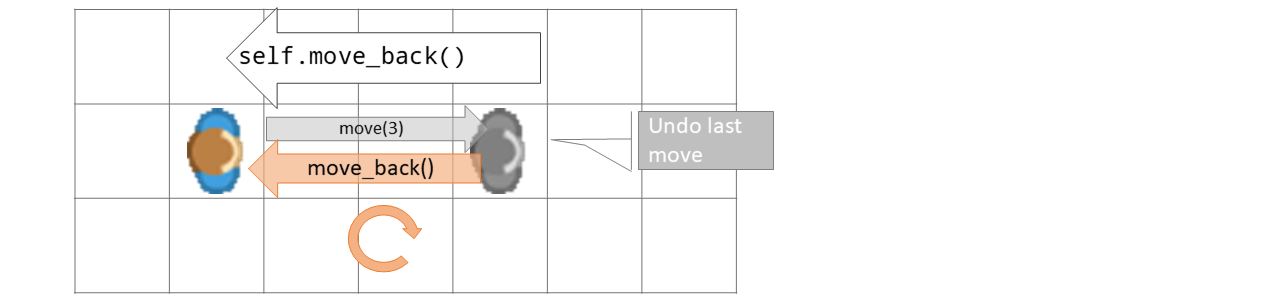
- Returns:
The moved actor
Examples
move_back when field is blocked:
def on_detecting_wall(self, wall):
    self.undo_move()
- property visible#
Whether the actor is currently visible.
- property width#
The width of the actor in pixels.
When the width of a actor is changed, the height is scaled proportionally.
Examples
Create a actor and scale width/height proportionally:
from miniworlds import *

world = World(800,400)

def create_actor(x, y):
t = Actor()
t.position = (x, y)
t.add_costume("images/alien1.png")
t.border = 1
return t

t0 = create_actor(0,0)
t1 = create_actor(50,0)
t1.height = 400
t2 = create_actor(300,0)
t2.width = 180

world.run()
- property world#
World this actor belongs to.